


insights: Realme Shortcodes
Realme Shortcodes
Overview of Realme
Realme is the most popular and demanding smartphone on today. Realme phones are loved by their consumer because of their high-end specs at a low cost. They mainly focused on the youth offerings are presented as great options for different demographics. They are known for embracing new technologies faster than many competitors. From higher refresh-rate displays to fast charging and AI-powered cameras, it continuously brings exciting features even to its lower-priced smartphones.
At the very first, Realme began its market as a sub-brand of OPPO. At this stage, Xiaomi’s Redmi series was growing fast in the South Asian smartphone market. So, to compete market with Xiaomi’s Redmi series, it came up with OPPO.

What are Short Codes?
Shortcodes are special dialing codes (like *123# or *411#) that activate a service on your mobile network.
Usefulness of Shortcodes on Smartphones
Shortcodes are small number-based codes that you can dial on your smartphone to access specific services instantly. These codes usually begin with * or # and are widely used by telecom operators, banks, and service providers. Shortcodes make everyday tasks easier, faster, and more convenient for smartphone users.
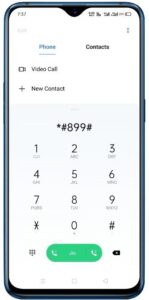
Realme shortcodes are special number combinations that you dial from the phone dialer to access hidden features. These codes enable you to check the IMEI, test sensors, view software details, and run hardware diagnostics within seconds.
List of Shortcodes
These codes are handy for technicians, Realme users, and anyone who wants to check their phone’s performance.
1. Realme Device Information Codes
| Purpose | Code |
| Check IMEI Number | *#06# |
| View Software Version | *#6776# |
| Phone Information / Battery Info / Network Info | *#*#4636#*#* |
| Diagnostics Mode | *#*#2486#*#* |
2. Realme Engineering & Hardware Test Codes
| Purpose | Code |
| Realme Engineering Mode | *#899# |
| Hardware Test Mode (Display, Camera, Mic, Sensors) | *#808# |
| Factory Mode / QC Test | *#*#6484#*#* |
| Sensor Calibration | *#808# |
3. Realme Network & SIM Service Codes
| Purpose | Code Example |
| Balance Check | *123# |
| Data Check | *141# |
| Call Forwarding Activate | *21# |
| Call Forwarding Deactivate | ##21# |
| Call Waiting Check | *#43# |
4. Realme Camera & System Codes
| Purpose | Code |
| Camera Information | *#*#34971539#*#* |
| Google Play Services Info | *#*#426#*#* |
| Field Test Mode | *#*#7262626#*#* |
5. Realme Reset & Recovery Codes
| Purpose | Code |
| Factory Reset (Soft Reset) | *#*#7780#*#* |
| Hard Reset / Wipe Data | Recovery Mode Only |
| Backup & Restore | Settings → Additional Settings → Back Up & Reset |
Benefits of Using Realme Shortcodes
Shortcodes are helpful because they allow you to perform various activities on your smartphone, like as:
- Test phone hardware without a service center
- Check software & network issues instantly
- Access hidden features for troubleshooting
- Improve device performance
- Verify if a Realme phone is genuine
These codes are handy when buying a second-hand Realme phone. Before purchasing a used smartphone, you can check whether all the tools, hardware, and other components are working or not.
Why Use These Smartphone Secret Codes?
Troubleshooting Your Phone
Smartphone secret codes are extremely useful when your device is not working properly. If you think there is a problem with your touch screen, battery, camera, speaker, sensors, Wi-Fi, or GPS, these codes help you run quick tests.
Verifying a Second-Hand Phone
If you are buying a used smartphone, these codes help you confirm whether the device is genuine and fully functional. You can instantly check the IMEI number, run hardware diagnostics, view the hidden software details, and verify that the phone has original components.
Advanced Settings for Power Users
For technicians, developers, and advanced users, secret codes provide access to deep system settings that are normally hidden from the public. Using engineering mode or diagnostic mode, you can modify network options, test hardware, check signal strength, view phone logs, calibrate sensors, and much more.
FAQs on Realme Shortcodes
Do Realme shortcodes work on all models?
Yes, most codes work on Realme C-series, Narzo, and Number series smartphones.
Are these Realme codes safe to use?
Information and test codes are safe, but reset codes can erase data, so use them carefully.
Do I need the internet to use these codes?
No, these codes work offline.
Why do technicians use Realme shortcodes?
Shortcodes allow quick testing of sensors, displays, batteries, and other hardware.
Thank You for Visiting Top Realme Shortcodes 2025.
Also see:
Best Realme Smartphone in 2025
Samsung Galaxy Tab A11 Price in Nepal
Google to Launch Pixel 10 Pro Fold
Iphone 17 to Launch in September
Best Smartphone Under 20000 in Nepal 2025
Xiaomi testing with 9000 mAh battery on Redmi
